
Testing Zephyr Projects with Twister
The extension supports running Twister tests. Click the beaker icon in the IDE for Zephyr sidebar to access the test panel.
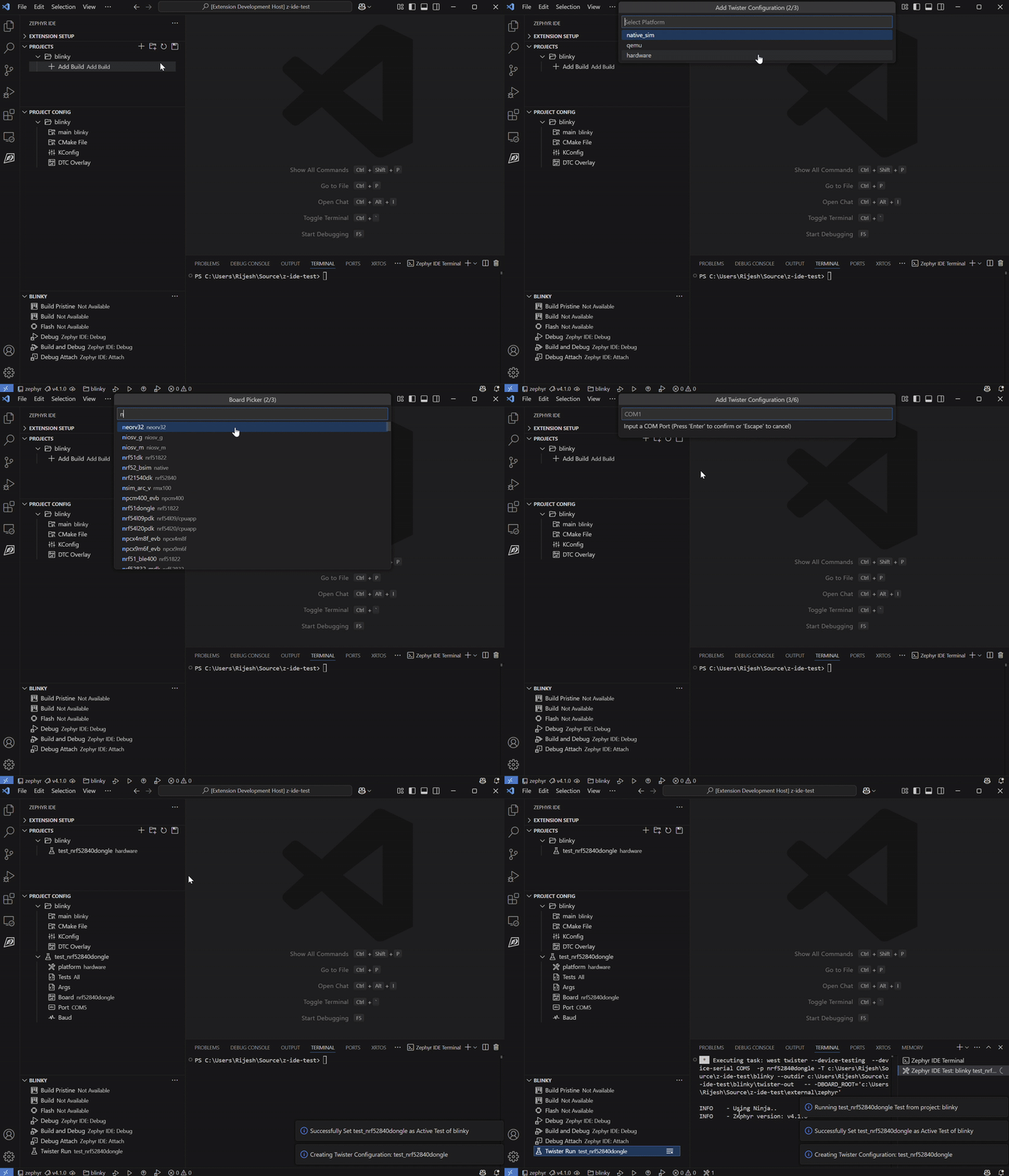
Adding a Test
Section titled “Adding a Test”- Click the beaker icon in the sidebar
- Click Add Twister Test and select the test suite to add
- Configure the test parameters (platform, selected tests, optional serial settings, and extra args)
- Click Run Test or use
Zephyr IDE: Run Testfrom the command palette
Managing Tests
Section titled “Managing Tests”Tests are stored in .vscode/zephyr-ide.json alongside project and build configurations. Each test entry specifies:
- Platform —
native_sim,qemu, orhardware - Tests — one or more test IDs (or
All) - Extra args — additional Twister arguments
- Serial settings — optional
serialPortandserialBaudfor hardware targets
Multiple test configurations can be added per project. Use Zephyr IDE: Set Active Test to switch the active test, and Zephyr IDE: Reconfigure Active Test to adjust parameters.
Use Zephyr IDE: Delete Test Output Directories to clean up Twister output between runs.